
PHP2Shell and the New Wave of Cyber Threats: What Every Website Owner Needs to Know
The October 2026 security field guide for beginners, IT technicians, cybersecurity teams, MSPs, and business owners
RPIT Field Notes · Updated 24 October 2026
The uncomfortable truth: a website can have clean application code, a reputable host, and a popular CMS—and still be exposed because the runtime beneath it is vulnerable. Meanwhile, a trusted remote-management key, a compromised build dependency, a weak certificate key, or an over-privileged cloud integration can turn one foothold into a much larger problem.
This is a practical, defensive guide to the incidents and advisories that deserve attention right now. The technical findings and incident status below are linked to primary sources: upstream maintainers, vendors, security advisories, and the organisations involved. Claims that could not be confirmed from those sources are labelled accordingly rather than promoted as fact.
The story is bigger than one vulnerability
Imagine your website as a building.
- The application is the business operating inside it.
- PHP, the database, and the operating system are the building's plumbing, wiring, and foundations.
- Plugins, packages, and CI/CD tools are contractors with varying levels of access.
- API keys, certificates, and remote-management tokens are the master keys.
- Logs and backups are your security cameras and recovery plan.
A security incident can begin in any one of those layers. The damage often spreads because those layers trust each other too much.
That is why October's warning signs should not be treated as one giant, mysterious “cyber meltdown.” The verified events are different: a critical PHP runtime flaw, a remote-management credential incident affecting WordPress sites, weak intermediate certificate keys, malicious Python package releases, a cloud-platform compromise involving stored secrets, a Microsoft 365 backup-service incident, and critical patches for GitLab and Cisco products. They do not all share one proven attacker or one confirmed cause.
The common lesson is more useful than the headline: inventory what you run, patch the exposed layer, revoke secrets that may have escaped, and investigate for evidence of access.
The Chain of Incidents: How the Crisis Unfolded
The incident did not happen in isolation. A vulnerability, its exploitation, and subsequent activity across connected systems created a chain of events with wider implications.
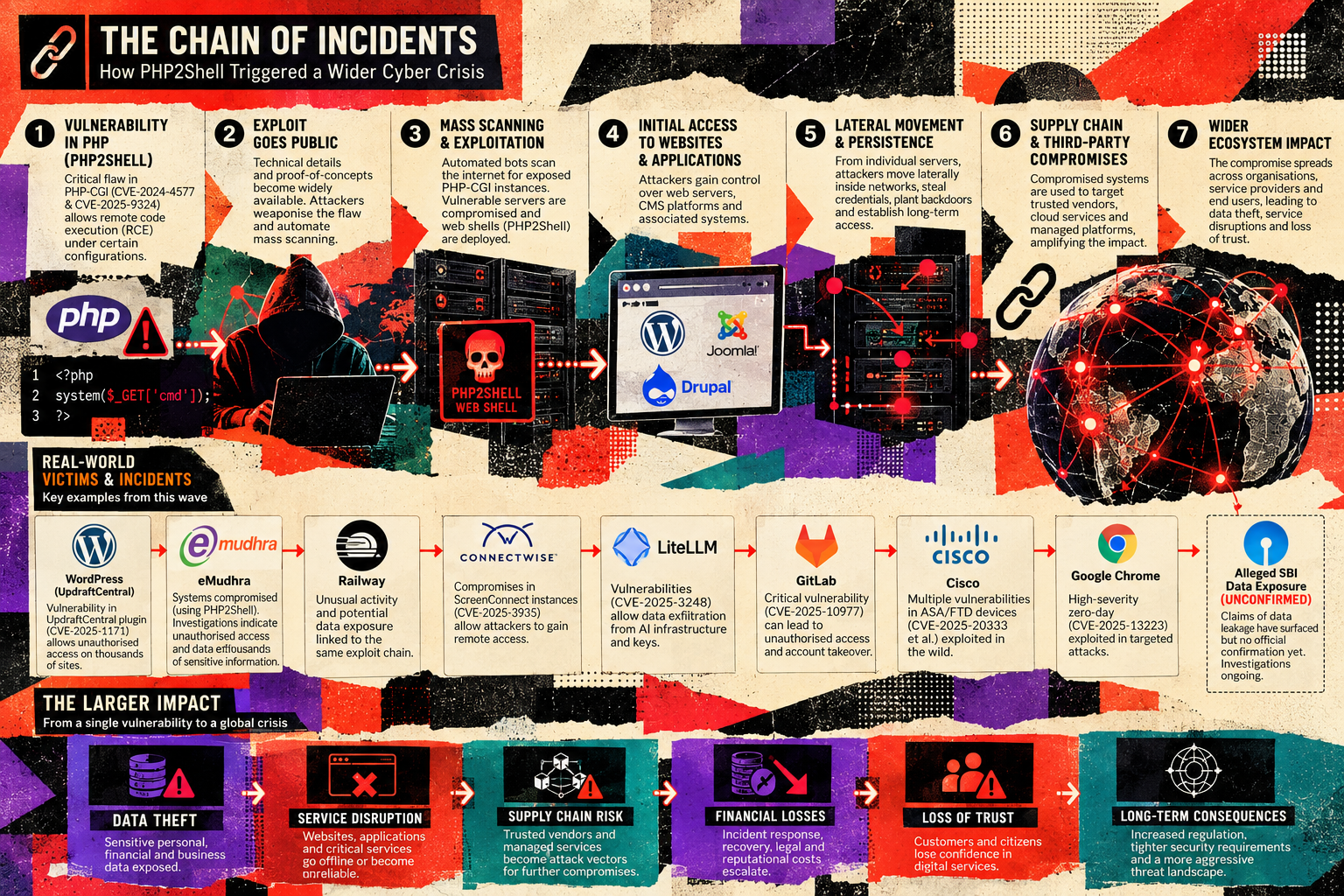
Figure 1: The chain of incidents and the wider cybersecurity impact associated with PHP2Shell. Unconfirmed allegations should not be treated as established facts.
The following sections examine the individual incidents, separating verified details from allegations and unconfirmed reports.
🚨 Priority one: PHP2Shell
On 21 October 2026, the PHP project released security updates for two critical vulnerabilities—CVE-2026-109618 and CVE-2026-109619—that can allow unauthenticated remote code execution under the right conditions. The official PHP notice says that updating is the only complete remediation. The PHP security archive and upstream release announcement provide the authoritative patch information; CERT-In also issued an advisory to MSMEs.
What does “remote code execution” actually mean?
Remote code execution (RCE) means an attacker can cause a vulnerable system to run code of the attacker's choosing over a network. It does not automatically mean the attacker becomes root or owns every connected system. The actual reach depends on the process account, file permissions, secrets available to the application, network segmentation, and other controls.
But an internet-facing PHP service often has valuable access already: database credentials, session material, API tokens, filesystem paths, upload directories, and the ability to communicate with other services. If an attacker gets code execution inside that worker, those permissions can become a launchpad for data theft, a web shell, malicious files, rogue administrator accounts, or movement into less-protected systems.
Why this one is unusual
These are flaws in PHP's core runtime, not simply bugs in WordPress, Drupal, or Joomla. Wiz Research demonstrated exploit chains against current container images of those applications; PHP itself is the vulnerable layer, so replacing one plugin or updating only a CMS theme does not fix it. See the original technical write-up from Wiz Research and the PHP project's security notice.
At a high level, the problems involve memory corruption and stale internal state after fatal errors or out-of-memory conditions. Under certain request and worker conditions, PHP may reuse memory that should no longer be treated as valid. Researchers combined these primitives into chains that can disclose process memory and achieve RCE. That memory can contain secrets from other requests handled by a worker.
The exploits are technically complex and not every attempted request will work against every configuration. That is not a reason to wait. Network reachability, the lack of an authentication requirement, the critical severity, public technical detail, and the existence of working research demonstrations make patching urgent.
Affected PHP versions: use the exact branch you run
| PHP branch | Vulnerable versions | Fixed upstream release | |---|---|---| | PHP 8.5 | Before 8.5.12 | 8.5.12 | | PHP 8.4 | Before 8.4.27 | 8.4.27 | | PHP 8.3 | Before 8.3.36 | 8.3.36 | | PHP 8.2 | Before 8.2.35 | 8.2.35 | | PHP 8.1 and older | Upstream-supported fixes are no longer routinely provided | Check your OS, hosting provider, or commercial support vendor; upgrade where possible |
These patch versions are taken from PHP's release archive and the upstream GitHub security advisories for CVE-2026-109618 and CVE-2026-109619. PHP 8.2 is scheduled to reach end of life on 31 December 2026, so plan a supported-version upgrade rather than treating 8.2.35 as a long-term destination.
Do not assume php -v tells you what your website is running. The command reports the CLI binary; a hosting panel, PHP-FPM pool, Apache module, container, or managed platform may use a different runtime. Check the PHP version actually serving each production site. In cPanel, inspect the domain's PHP selection and hosting-provider package status; on managed hosting, ask the provider for the runtime version and patch confirmation.
One more PHP advisory appeared on 23 October
The PHP archive added an informational advisory concerning session upload progress on 23 October. It describes a narrower, unusual configuration that can leave another RCE path: session upload progress remains enabled, an application changes session.serialize_handler at runtime from php_binary or php_serialize to php, and the relevant sequence occurs before session_start(). PHP says it is tracking this as CVE-2026-115560 and recommends setting session.upload_progress.enabled=0 until the next regular bug-fix release for protection against that particular path. Read the live PHP 2026 archive for the current status.
This follow-on item does not mean every PHP site has a second equally likely exposure. It means the incident response is still moving, and defenders should revisit upstream advisories rather than assuming the first patch announcement is the end of the story.
Patch note: if your host controls PHP for you, open a ticket and ask for the exact patched runtime build serving every domain. If it cannot be updated quickly, get a qualified administrator to apply the upstream's interim mitigations and assess whether the service should be temporarily isolated. WAF rules and configuration mitigations are temporary layers, not substitutes for the full fix.
What should you look for? PHP2Shell detection without guesswork
As of this publication date, the primary public technical write-up does not provide a universal attacker IP list or a single hash that reliably identifies all PHP2Shell exploitation. This is a request-driven runtime flaw; infrastructure and exploit variants differ. Avoid inventing a blocklist or treating a generic string as conclusive proof.
Wiz recommends investigating these behavioural signals on affected servers:
- unusual or malformed multipart/form-data requests;
- multipart requests followed by PHP memory-limit errors or repeated HTTP 500 responses;
- unexpectedly large or malformed
PHPSESSIDresponse cookies; - unexplained PHP worker churn, crashes, or restarts.
These are hunt leads, not proof of compromise. An upload endpoint can legitimately receive multipart requests; a 500 can have many causes. Correlate request patterns, timestamps, error logs, process events, and outbound traffic. The technical context is in the Wiz PHP2Shell write-up; the full remediation remains the PHP security release.
A safe hunting checklist
Search the web-server, reverse-proxy, PHP-FPM, operating-system, EDR, and egress logs for a sequence, not one isolated event:
- Unexpected multipart requests or request sizes near the time of failure.
- A burst of memory-limit/fatal errors, repeated 500s, or worker restarts shortly afterward.
- PHP responses with abnormal
PHPSESSIDlength or formatting. - New or modified PHP files, especially where uploads should not create executable code.
- PHP workers launching unexpected child processes, changing startup files, or connecting to unusual external destinations.
- New scheduled tasks, services, SSH keys, cron entries, web-server configuration changes, or unexpected privileged accounts.
- Outbound traffic that does not fit the application's normal role, especially after a suspicious request sequence.
Adapt these to your logs and baseline. A generic search concept might look like this (not a ready-to-run SIEM query):
multipart_request
  followed_by (PHP_memory_error OR HTTP_500_burst OR worker_restart)
  within a short time window
Then pivot by host, virtual host, PHP pool, source address, response cookie size, process tree, and outbound destination. Do not publish or run exploit payloads against production to “test” exposure. Use approved scanners and controlled validation.
The other incidents matter because they show different ways trust can fail
PHP2Shell is the headline runtime issue, but a resilient organisation must also understand adjacent failure modes. The incidents below are separate events; they are included because their official disclosures show what to do when a trusted control plane, package, certificate, or integration becomes a risk.
1. WordPress remote management: one key can become a site-control problem
TeamUpdraft disclosed unauthorised access to teamupdraft.com over the weekend of 17–18 October. The company said it believed its customer database had been accessed, including account information and connection keys. It also said the attacker used a compromised key to reach sites through UpdraftCentral and install malicious plugins or create accounts; the full scope remained under investigation in its official incident notice.
The key distinction: TeamUpdraft said the UpdraftPlus plugin itself and its downloads were not affected, self-hosted UpdraftCentral was not affected, and backups stored in users' own remote storage were not directly affected by the website incident. However, sites reached through UpdraftCentral need a direct inspection, and remote-storage credentials should be re-authorised/changed as a precaution where relevant.
What affected users should do:
- Update UpdraftPlus Free to 1.26.13 or later, or Premium to 2.26.13 or later.
- Log in directly to each WordPress site, not only through the remote-management dashboard.
- Delete old UpdraftCentral connection keys and reconnect only after reviewing the site.
- Inspect administrator/editor accounts, plugins, and Must-Use plugins for anything unfamiliar.
- Change administrator passwords; re-authorise remote storage and rotate storage keys if the site may have been accessed.
- If suspicious files or accounts are found, preserve evidence and consider restoring from a backup created before 17 October, after determining the clean recovery point.
The vendor says the release revokes old connections, but updating alone does not prove an individual site was never accessed. See the TeamUpdraft incident timeline and customer instructions.
2. eMudhra: certificate trust is infrastructure too
On 20 October, Mozilla described a report concerning private keys associated with eight eMudhra intermediate certificates. Such keys could be used to issue fraudulent HTTPS certificates and impersonate sites if an attacker could intercept traffic. Mozilla blocked the affected certificates in Firefox's OneCRL and issued additional trust-store updates; details are in the Mozilla Security Blog.
The company’s own incident statement says the eight intermediate keys were cryptographically weak, all eight intermediates were revoked, seven had never been used in production, and the one deployed had not issued an end-entity certificate. eMudhra said it had no evidence of data being breached and that its root key was not the affected key; browser/root-store distrust was a precautionary response. The root-cause investigation was still ongoing as of its 22 October update.
This is a certificate-authority control failure, not the same category as PHP RCE. The operational response is also different: keep browsers and trust stores current, follow the affected certificate authority’s instructions, verify any replacement certificates and trust chains, and maintain CA redundancy for services where a certificate-chain incident could cause outages. Do not independently invent certificate revocation rules or assume every eMudhra service was compromised—the company explicitly distinguished the affected TLS hierarchy from separate products and services.
3. Railway: environment variables are secrets, not configuration decoration
Railway's preliminary incident report says that an attack beginning around 20 October led to unauthorised access to a subset of its internal systems and that a subset of stored environment-variable secrets were exposed and, for some, decrypted. Railway said no user accounts were logged into as part of the incident. It estimated that at most 1.85% of workspaces had some environment variables potentially compromised; the wider set of keys sent for revocation was larger because Railway notified providers out of caution. The investigation was still ongoing, including whether source code had been accessed.
Railway's current theory is that the attacker was seeking valuable AI-provider API keys, potentially to conduct model-distillation attacks. That is the platform operator's preliminary forensic assessment, not proof that all contemporary attacks were AI-driven or that every customer secret was stolen.
Railway's stated customer actions are practical: rotate sensitive variables and keys stored before 21 October, remove public database network access, inspect GitHub audit logs and installed app access, and examine container-registry audit logs for unexpected activity. See the official incident report and 23 October status update.
Lesson: if a secret was available to a compromised platform, assume it may need rotating—even if the dashboard looks normal. Rotate from a clean device/session, record what was replaced, and monitor the old key for attempted use.
4. ConnectWise Cloud Backup: protect the tenant, not just the vendor
ConnectWise's Trust Center reported unauthorised access to application credentials associated with Cloud Backup (formerly SkyKick). As of its 24 October update, service restoration was taking place in controlled phases and partner connections were to remain disabled until service-specific instructions arrived. ConnectWise said its backup archives remained encrypted, isolated, and without indication of compromise; it also said that individual Microsoft 365 tenants still needed review.
For MSPs and administrators, that final point matters. A supplier's containment does not automatically remove persistence inside a customer tenant. Review Microsoft Entra ID sign-in and audit logs, application registrations, service principals, credentials, permissions, and changes made by backup-related apps. Keep affected connections disabled until ConnectWise's official reconnection instructions apply. Do not declare the tenant safe simply because a vendor portal has come back online.
5. LiteLLM: a package install can be the initial compromise
The GitHub Advisory Database entry identifies malicious PyPI versions litellm 1.82.7, 1.82.8, and 1.107.0. It describes malicious code capable of exfiltrating sensitive secrets and notes that there are no “patched versions” of these malicious releases—the correct response is to remove the affected builds and move to a known-clean release after checking current maintainer guidance. The project's security issue and incident discussion describes the compromise of the package publishing path and advises credential rotation for affected environments.
If any of those versions were installed and executed, treat the machine and secrets available to that environment as potentially exposed. Rebuild from a known-good environment where practical, rotate API keys and other secrets present in environment variables or configuration files, review build logs and package lockfiles, and check for unexpected outbound activity. The project issue identifies models.litellm.cloud as an exfiltration destination in its analysis; consider it a campaign-specific indicator, not a universal indicator for unrelated intrusions.
This is the software-supply-chain problem in a nutshell: the source code you intended to install may not be the code the package registry delivered. Pin dependencies, lock builds, verify release provenance, and avoid building production from floating versions.
6. GitLab and Cisco: do not stop at the web application
The official GitLab Critical Patch Release of 21 October includes CVE-2026-110264, a critical, unauthenticated remote-code-execution vulnerability (CVSS 10.0) involving integer overflow while compiling a specially crafted regular expression. Fixed versions are 19.5.1, 19.4.3, 19.3.6, 19.2.9, 19.1.9, 19.0.10, and 18.11.13, depending on branch. GitLab recommended immediate upgrades for self-managed installations. The same release contains other authentication, access-control, and credential-exposure fixes, so do not treat it as a one-CVE patch.
Cisco also published October 21 advisories that deserve product-specific review:
- Cisco Expressway CVE-2026-76466: CVSS 9.8; under the documented conditions, an unauthenticated remote attacker with network access to a vulnerable clustered Expressway device could execute OS commands as root. Cisco says there is no workaround and recommends a fixed release; it reported no public announcements or malicious use known to PSIRT at publication. See the official Cisco advisory.
- Snort 3 and related product fixes: Cisco published a set of security-hardening advisories and individual findings, including a control-channel command-execution issue for open-source Snort 3 (CVE-2026-76524) and multiple denial-of-service issues. See Cisco's Snort 3 control-channel advisory and October 2026 Snort hardening release.
This isn't a claim that these products were all exploited in the same campaign. It is an operational reminder: critical issues can surface across the stack during the same patch window. Use each vendor's exact branch and deployment instructions.
7. Chrome: browser updates are part of the same routine
Google's official Chrome Releases page recorded a desktop stable-channel update on 20 October to Chrome 156, with platform-specific builds and gradual rollout. Browser security is often a chain of small fixes—memory safety, renderer isolation, graphics, media, and permissions—rather than one dramatic alert. Let managed browsers update, verify update status through Settings → About Chrome, and ensure endpoint policy is not pinning machines to an obsolete channel. Use the build offered for your platform and channel; an early-stable release is not necessarily available to every user immediately.
What about the reported SBI data exposure?
A bank-data breach is a serious allegation. In the primary-source material available for this article, I could not verify a definitive public statement from SBI or a competent authority that establishes the alleged exposure's scope, record count, and cause. This article therefore does not present an SBI data breach or a number of affected records as a confirmed fact. That is not a claim that nothing happened; it is a refusal to promote an unverified claim as established. If SBI, CERT-In, RBI, an exchange filing, or another accountable primary source publishes verifiable details, the article should be updated with that evidence.
The timeline: several events, several kinds of risk
| Date (2026) | Confirmed or officially reported event | Why it matters | |---|---|---| | 17–18 October | eMudhra reported/revoked affected intermediate CA keys; TeamUpdraft identified unauthorised access to its website; ConnectWise's Cloud Backup investigation was underway. | Trust and credential risk can exist outside a website's own code. | | 19 October | TeamUpdraft published incident guidance and released UpdraftPlus updates that revoke old UpdraftCentral connections. | Sites still need local inspection even after keys are revoked. | | 20 October | Railway detected a targeted campaign affecting internal systems; Chrome shipped a stable-channel desktop update; PHP CVE details began circulating before the coordinated release. | Attackers can target secrets and infrastructure while defenders are still coordinating fixes. | | 21 October | PHP released fixes for CVE-2026-109618 and CVE-2026-109619; GitLab published critical patches; Cisco published several advisories. | Patch priority spans more than one product family. | | 22 October | Railway published a preliminary incident report; GitLab published its PHP2Shell research response; eMudhra updated its statement. | Incident scope and remediation details continue to evolve after first notice. | | 23 October | PHP added an informational advisory for a narrow session-upload-progress edge case (CVE-2026-115560); CERT-In issued a PHP2Shell advisory for MSMEs. | Recheck live vendor guidance after initial patching. | | 24 October | ConnectWise reported phased restoration and continued tenant review; its guidance remained to keep affected connections disabled until formal instructions. | Restoration is not equivalent to a cleared customer environment. |
The timeline draws on the PHP archive, TeamUpdraft incident page, Mozilla, eMudhra, Railway, GitLab, Cisco, and ConnectWise.
Indicators of compromise: what's useful and what's noise?
An IoC is useful only when it is sourced, scoped, and interpreted correctly. A file name, IP address, or domain reported for one campaign may have limited lifetime and can create false positives if applied without context. At the same time, “no known IoCs” does not mean “no way to investigate.”
| Incident | Publicly supported indicator or observation | Confidence and limitations | Defensive response | |---|---|---|---| | PHP2Shell | Strange multipart requests followed by PHP memory-limit errors/500 bursts; unexpectedly large or malformed PHPSESSID response cookies; unexplained worker churn. | Behavioural signals from the original researcher; not unique signatures and not proof alone. | Correlate HTTP, PHP, process, and egress logs. Patch runtime immediately. | | UpdraftCentral | Unexpected connected sites; unfamiliar users (including unexpected editor/admin roles); unrecognised plugins/MU-plugins; unusual client IPs and remote-management activity. | Vendor-published checks; no universal official attacker IP/hash supplied in the incident notice. | Inspect each WordPress install directly, revoke stale keys, rotate relevant credentials, and preserve logs. | | LiteLLM PyPI compromise | Affected package versions 1.82.7, 1.82.8, 1.107.0; the project issue names models.litellm.cloud; litellm_init.pth is associated with the 1.82.8 package report. | Specific to the malicious package campaign; validate package provenance and process context. | Quarantine affected environments, rebuild cleanly, rotate every exposed secret, review outbound DNS/proxy logs. | | Railway | Potential exposure of environment variables and API credentials; provider revocation notices may have been sent broadly as a precaution. | Railway said the maximum potentially affected subset was 1.85% of workspaces; broader key revocation does not prove every notified key was stolen. | Rotate secrets stored before 21 Oct; review source-hosting app access and container registry audit logs. | | eMudhra | Trust-store blocks and certificate-chain changes concerning eight named intermediate certificates. | This is a PKI/trust-store problem, not an attacker IP/hash list. The company said no end-entity certificates had been issued by the affected intermediates. | Apply browser/trust-store updates and follow official CA/customer instructions. | | ConnectWise Cloud Backup | No universal public attacker IP or file hash identified in the cited status notice. | Investigation remained ongoing; absence of public IoCs is not assurance of no tenant changes. | Keep affected connections disabled until official reconnection instructions; review Microsoft 365 sign-in/audit logs and app permissions. |
Never copy an IoC into production block rules just because it appears in a screenshot or a forum comment. Verify its publisher, time window, context, and whether the vendor has confirmed the relationship. A malicious domain can be repurposed or taken down; an IP can be shared by legitimate hosting; a file name can be copied by an unrelated admin. Use multiple indicators and surrounding behaviour to support a decision.
Do this first: the practical response checklist
If you're a beginner or a small website owner
Do
- Ask your host which PHP runtime serves each website and whether it is on a fixed build: 8.5.12, 8.4.27, 8.3.36, or 8.2.35, or a documented vendor-backported fix.
- Back up files and databases before a major runtime change; verify that the backup can actually be restored.
- Update the CMS, plugins, themes, server packages, and browser—but remember that the PHP runtime patch is separate from the WordPress core/plugin update.
- Turn on MFA for hosting, CMS administrators, remote management, source control, and cloud dashboards.
- Use unique passwords and a password manager. Rotate API keys and database credentials if the environment may have been compromised.
- If you find an unknown admin, plugin, file, deployment, app registration, or outbound connection, take screenshots/log exports and call a professional before deleting everything.
Don't
- Don't assume “WordPress is updated” means PHP is patched.
- Don't create a public
phpinfo()page to check versions; it can expose environment details. Use the hosting panel or a trusted administrator. - Don't install random “security fix” ZIP files sent by email or chat.
- Don't delete suspicious files before preserving evidence if an incident is suspected.
- Don't treat a successful homepage load as proof the site is clean.
If you're a technician, sysadmin, or MSP
Use this order:
1. Inventory: list domains, PHP SAPIs/pools, container images, CMS sites, reverse proxies, exposed admin panels, remote-management services, and external integrations. Check the version actually serving web requests, not just the CLI binary.
2. Prioritise exposure: internet-facing runtimes first, then shared-hosting tenants, public admin interfaces, production CMS sites, and systems with powerful secrets. Prioritise the fixed PHP runtime and the separate GitLab/Cisco patches if you manage those products.
3. Patch and restart safely: stage where possible, validate compatibility, deploy the patched PHP/vendor package, restart all relevant workers, and verify the serving version. For PHP branches no longer supported upstream, get a vendor patch or plan migration; do not assume an old branch is safe because it still runs.
4. Reduce exposure while patching: follow the current PHP advisory's interim controls if patching cannot happen immediately. For the documented upload-progress edge case, set session.upload_progress.enabled=0 in a server-level configuration that applies before request parsing and restart all workers. Do not mistake a mitigation for the full fix, and do not copy configuration changes blindly into production.
5. Hunt: correlate the signals in the IoC section; review PHP worker process trees, filesystem changes, scheduled tasks, new accounts, outbound connections, hosting control-panel activity, and changes to secrets. For UpdraftCentral, inspect every connected site, not only the central dashboard.
6. Rotate: after patching or containment, rotate affected keys from a clean system. Prioritise API keys, cloud credentials, CI/CD tokens, database passwords, deployment keys, backup credentials, session/signing secrets, and credentials present in an environment potentially reached by a malicious package.
7. Validate: run integrity checks, review file owners and permissions, confirm unexpected administrators and plugins are removed, verify backups, and keep heightened monitoring in place. If RCE or a backdoor is plausible, reinstallation from a known-good image may be safer than trying to clean files in place.
If you're a cybersecurity professional
- Maintain an exposure matrix by asset, software branch, public reachability, owner, criticality, and patch state.
- Separate vulnerable, scanned, exploited, compromised, and data-exfiltrated states in your ticketing. They are not synonyms.
- For PHP2Shell, look for correlated request/error/worker behaviours and then pivot into endpoint telemetry. Avoid using a single HTTP 500 or multipart request as a high-confidence alert.
- For UpdraftCentral, investigate remote-management authorisation, unexpected users/roles, plugin upload events, and subsequent administrator sessions.
- For LiteLLM, examine package lockfiles, build provenance, interpreter-startup files, environment-variable exposure, and outbound connections; if a malicious package executed, rotate secrets even if malware removal looks successful.
- For Railway/ConnectWise, review identities and downstream control planes—not only the provider's own dashboard. Inspect Entra ID audit/sign-in events, app registrations, service-principal credentials, consent grants, GitHub/GitLab app installations, registry logs, and access changes.
- Preserve evidence, record UTC timestamps, hashes, source systems, and actions taken. Keep findings reproducible and label confidence.
- Use ATT&CK mappings as an analysis aid only when evidence supports the behaviour. Do not map a generic alert to a technique merely to make the report look complete.
If you own a business
You do not need to be a reverse engineer. You need to know who is accountable and what has been verified.
- Name one incident lead and one technical owner. Make sure they can reach the hosting provider, MSP, registrar, DNS provider, cloud platform, and payment/identity vendors.
- Require written confirmation of affected versions, patch deployment, credential rotations, and residual risks—not simply “we updated everything.”
- Keep backups isolated from production credentials; test restoration; keep a copy of important logs outside the affected host.
- Know which customer records and business systems the service can access. That determines the potential blast radius of an RCE or stolen API key.
- Ask counsel and the relevant privacy/security experts whether customer, regulator, CERT-In, contractual, or other notifications are legally required. Requirements depend on jurisdiction, data, contracts, and facts; do not guess.
- Prepare a plain-language customer statement that distinguishes confirmed impact from investigation in progress.
A concise emergency playbook
If you suspect compromise, work through this list in order:
- Contain safely. Limit public exposure or isolate the affected host/service if risk warrants it, while preserving evidence and service continuity where possible.
- Record before altering. Export logs, note timestamps and running versions, preserve suspicious files, and capture cloud audit trails.
- Patch the entry point. Use the official fixed package or vendor-supported remediation—not a third-party binary from an unverified source.
- Revoke and rotate. Treat secrets available to a compromised process or platform as potentially exposed; rotate from a clean environment.
- Inspect persistence. Check accounts, plugins, scheduled tasks, startup files, modified application code, process trees, and outbound traffic.
- Recover cleanly. Restore from a known-good backup or rebuild when integrity cannot be established; verify the backup itself and rotate secrets that were present at the time of compromise.
- Monitor and communicate. Watch for re-entry, validate the fix, document unknowns, and notify affected parties when required.
Patching closes a known door. It does not prove nobody walked through it yesterday.
The five costly misconceptions
“We use WordPress, not PHP.” WordPress executes on PHP. The runtime can be vulnerable even when the CMS code is not the source of the flaw.
“The WAF blocks it, so we can wait.” WAF rules reduce exposure but may not cover every path or configuration. PHP's own guidance says the security update is the complete fix.
“No suspicious log entry means no compromise.” A runtime-level exploit can leave limited application-level evidence. Correlate infrastructure, process, and network telemetry.
“The vendor rotated the key, so our tenant is clean.” Revoking a credential prevents future use of that key; it does not automatically undo actions already performed with it.
“AI caused all these incidents.” The evidence does not support that blanket statement. Wiz says frontier AI contributed materially to finding and adapting PHP exploit chains. TeamUpdraft said the speed and quality of early attack artefacts suggested AI may have accelerated activity. Railway's preliminary forensics describe a likely search for AI-provider API keys. Those are distinct findings and assessments—not proof of one AI-controlled global campaign.
What the numbers do—and do not—tell you
The PHP2Shell research uses a broad PHP usage-share estimate to explain why the runtime matters. That number is not a count of vulnerable websites, successful exploits, or compromised organisations. A vulnerable version on an exposed service is a risk; an HTTP request is an attempt; confirmed code execution is exploitation; a confirmed foothold is compromise; verified exfiltration is a separate finding.
The same discipline applies to the Railway incident. Railway said up to 1.85% of workspaces may have had some environment variables potentially compromised, while a larger set of keys was sent for precautionary revocation. Those are different measurements. Never turn an upper-bound exposure estimate into a confirmed victim count.
The same discipline applies to unverified allegations about banks or public institutions. Until a primary source establishes scope and impact, label the claim as unconfirmed. Accuracy is not a lack of urgency; it is how urgent advice remains credible.
What this means for AI-era security
AI does not need to invent a new vulnerability category to change cybersecurity. It can make discovery, debugging, variant generation, and adaptation faster. The PHP2Shell disclosure is a strong example because the bugs had existed for years, while the practical exploit chain required detailed memory reasoning and repeated testing. The responsible response is neither “AI means doom” nor “AI doesn't matter.” It is to assume that complexity is a weaker defensive barrier than it used to be, and to shorten the time between disclosure, asset discovery, patching, and verification.
Defenders can use the same capabilities to triage advisories, map software inventories, write detection candidates, compare configuration drift, and explain incidents to non-specialists—but tools must be validated. AI-generated detection rules can be wrong; AI-generated remediation can break production; AI-generated incident summaries can overstate evidence. Human review, change control, and reproducible verification still matter.
The takeaway
The threat landscape is not one story and not one patch. It is a reminder that modern websites and businesses depend on layers of trust: runtime code, plugins, build systems, cloud secrets, certificate authorities, management integrations, source-control platforms, and browsers.
For beginners: update the actual runtime, turn on MFA, keep recoverable backups, and ask your host specific questions.
For technicians: inventory first, patch the exposed layer, validate the running version, hunt for behavioural evidence, and rotate the secrets that may have been exposed.
For security professionals: separate signals from proof, preserve evidence, scope the blast radius, and keep your detection logic tied to source-backed behaviours.
For entrepreneurs: know who owns the response, keep clean backups, demand verification, and understand which systems and secrets a compromised service could reach.
The most important security question is not simply, “Are we vulnerable?” It is:
“If someone got in, what could they reach—and how quickly would we know?”
Answer that honestly, and turn it into concrete controls before the next alert arrives.
Primary-source reference desk
These are the original advisories, vendor notices, or incident-owner disclosures used for this article. The supplied news links were treated as research leads, not cited as authorities.
- PHP 2026 security archive — official patch matrix and 23 October upload-progress advisory
- PHP 8.5.12 release announcement
- PHP source advisory: CVE-2026-109618
- PHP source advisory: CVE-2026-109619
- PHP Foundation: security release and disclosure timeline
- Wiz Research: PHP2Shell technical details and behavioural detection clues
- CERT-In advisory for MSMEs: PHP2Shell
- WordPress.org: Critical PHP Security Release
- TeamUpdraft: October 2026 security incident and customer actions
- Mozilla Security Blog: eMudhra intermediate certificates
- eMudhra: certificate security incident statement and updates
- Railway: preliminary report on the 21 October security incident
- Railway: 23 October security-incident status update
- ConnectWise Trust Center: Cloud Backup incident updates and partner guidance
- GitHub Advisory Database: malicious LiteLLM PyPI versions
- LiteLLM project: supply-chain incident thread
- Google Chrome Releases: official desktop security updates
- GitLab: Critical Patch Release, 21 October 2026
- CERT-In vulnerability note: GitLab CE/EE
- Cisco: Expressway CVE-2026-76466
- Cisco: Snort 3 control-channel command execution
- Cisco: October 2026 Snort 3 security hardening release
RPIT Field Notes publishing pack
SEO title: PHP2Shell: Critical PHP RCE and the October 2026 Security Checklist
Alternative headline: PHP2Shell Is the Alarm. Your Whole Stack Is the Attack Surface.
URL slug: php2shell-october-2026-cybersecurity-checklist
Category: Cybersecurity
Tags: PHP2Shell, PHP Security, Remote Code Execution, CVE-2026-109618, CVE-2026-109619, WordPress Security, Supply Chain Security, Incident Response, CERT-In, Cloud Security, Cybersecurity for Small Business
Meta description (under 160 characters): PHP2Shell puts exposed PHP runtimes at risk. Get verified patches, detection clues, incident context, and practical actions for techs and business owners.
Homepage excerpt: PHP2Shell is a critical PHP runtime warning—but October's other incidents show why patching alone isn't enough. Learn what to fix, what to hunt for, and how to protect secrets, websites, cloud tenants, and customer trust.
Cover image concept: 1:1 retro editorial cybersecurity collage in the RPIT reference tone: PHP code/runtime at the centre, a compromised web server and server racks, broken lock, exposed secret-key icons, networked globe and warning signals. Use torn-paper layers, halftone texture, and a restrained palette of dark navy/black, red-orange, cream, teal, and purple. Keep any heading small; the art should tell the story without a giant headline.
Social sharing hooks:
- “Your WordPress site may be patched at the application layer and still be exposed underneath. PHP2Shell is a reminder to check the runtime—not just the plugins.”
- “A leaked remote-management key can become a website-control problem. A malicious package can become a secrets problem. A weak CA key can become a trust problem. Different incidents, one lesson: map the blast radius.”
- “No, every cyber headline is not one giant AI attack. Here's what primary advisories actually confirm—and what remains unverified—as of 24 October 2026.”
- “Patch the vulnerability. Rotate the secrets. Check for persistence. Verify the recovery. The complete defensive checklist for PHP2Shell and the October security incidents.”


Comments (0)
No comments yet — be the first.